

PixelTools Installer
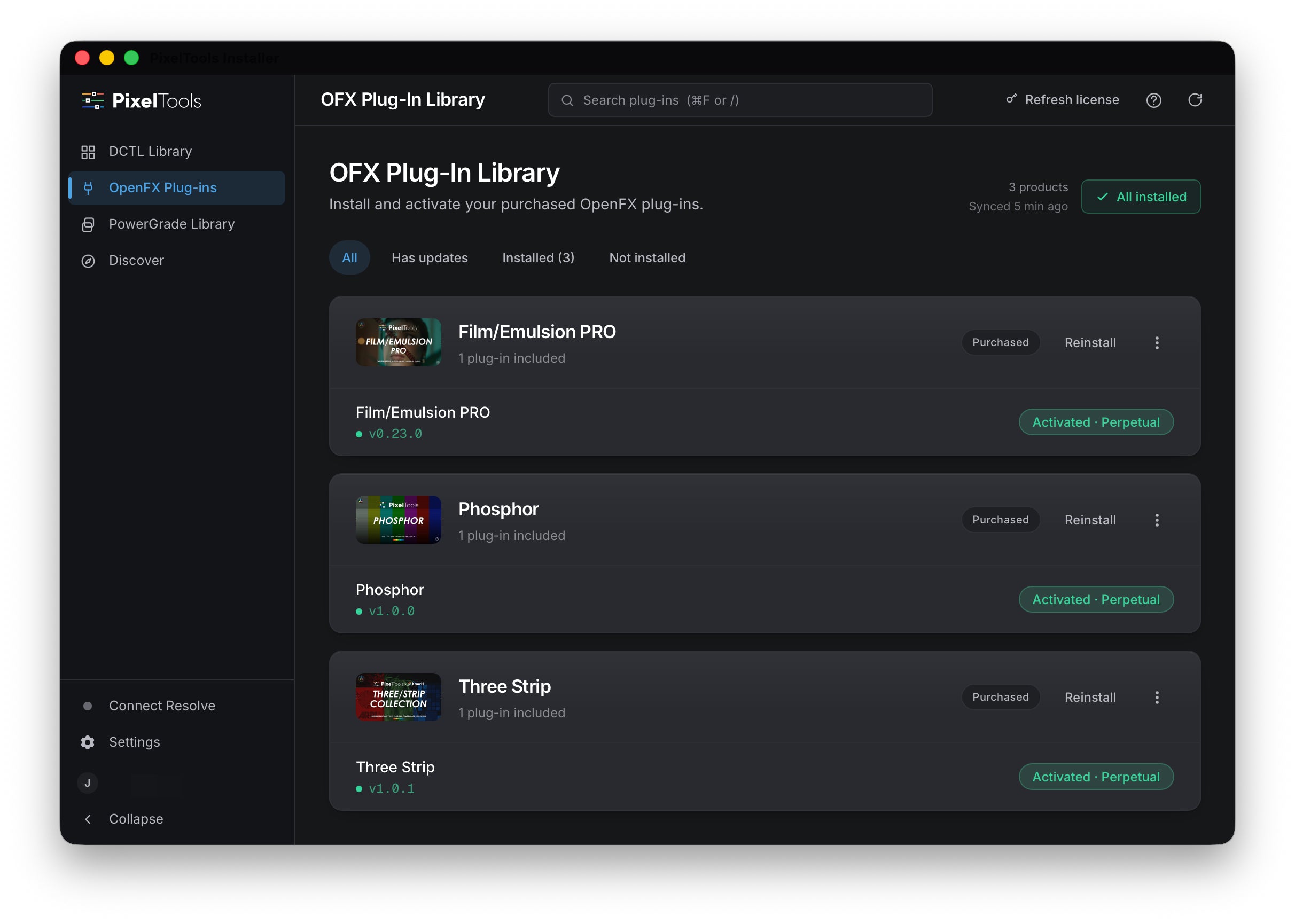
Install your PixelTools DCTLs, OpenFX plug-ins, and PowerGrades into DaVinci Resolve in one click.
Installs the tools tied to your account, free or paid. New here? Start with a free tool.
Apple-notarized and code-signed.
For macOS, Windows and Linux (beta). Requires DaVinci Resolve Studio 20 or later.


What it does
One-click install
The app locates your DaVinci Resolve installation and places your DCTLs, OpenFX plug-ins, and PowerGrades in the correct folders. Open Resolve and they are there.
Installs what you own
Sign in and the app loads your account. It installs your free tools, BASIC, and PRO products without a license key.
New purchases appear automatically
Open the app after a purchase and it is already listed. Your full library reflects your account, every session.
Updates in one place
When a tool you own has a new version, the app installs it in one click. It keeps itself current, too.
macOS, Windows and Linux (beta)
The installer runs natively on macOS, Windows and Linux (beta). Sign in on any machine and your library follows you.
Your existing setup stays intact
The app only adds PixelTools files to your Resolve folders. Your existing LUTs, projects, and tools are not changed or removed.
Plug-ins activate themselves
Your OpenFX plug-ins license the moment they install, and again each time you sign in. No keys to paste, no watermark, no separate activation step.
Every PixelTools product, one place
DCTLs, OpenFX plug-ins, and PowerGrades all install from the same app. Your whole PixelTools library, ready in one place.
How it works
Sign in to your PixelTools account
Open the app and sign in. New to PixelTools? Any free tool creates your account. The app loads your full library on sign-in.
The app reads your account
Everything tied to your account is listed, free and paid. The app installs only what you own.
Install to Resolve in one click
Select what you want to install. The app puts your tools in the correct DaVinci Resolve folders. Open Resolve and they are there.
What colorists say about the Installer
It's really great to have an easy way of installing everything right from one place.
Really appreciate it. It has a nice layout and is very practical.
System requirements
- macOS
- macOS 12 Monterey or later (Apple silicon and Intel)
- Windows
- Windows 10 (64-bit) or later
- Linux (beta)
- Rocky Linux 9 / RHEL 9 family, x86_64 (AppImage or Flatpak)
- DaVinci Resolve Studio
- Version 20 or later
- Account
- Free PixelTools account and an internet connection to sign in
Download PixelTools Installer
Version 1.1.4
| Platform | Best for | Size | Download |
|---|---|---|---|
macOS Recommended for you |
Apple silicon & Intel | Download for macOS | |
Windows Recommended for you |
Windows 10 & 11 | Download for Windows | |
Linux (beta) · AppImage Recommended for you |
Ubuntu 22.04+ / Debian 12+ | AppImage (.AppImage) | |
Linux (beta) · Flatpak Recommended for you |
Rocky / AlmaLinux / RHEL 9 / Fedora | Flatpak (.flatpak) |
Free to download. Installs the tools tied to your account, free or paid. New here? Start with a free tool.
PixelTools Installer
Frequently asked questions
Do I need a PixelTools account?
Yes. The app signs in to your PixelTools account and installs only the products tied to it. New to PixelTools? Any free tool creates your account. Sign in and your library is ready to install.
Do I need DaVinci Resolve Studio?
Yes. PixelTools DCTLs and OpenFX plug-ins require DaVinci Resolve Studio, version 20 or later. The free version of DaVinci Resolve does not support them.
I use Linux or an iPad. Can I use the installer?
Linux, yes. The installer app now runs on Linux in beta (AppImage and Flatpak) alongside macOS and Windows, so you get the same one-click install. On iPad there's no installer app, so download your files from your account and add them to DaVinci Resolve by hand. Everything still works, you just install it manually.
Will it change my existing LUTs or setup?
No. The app only adds PixelTools files to your DaVinci Resolve folders. It does not touch your own LUTs, your projects, or your existing setup, and you can remove its files at any time.
Do I get free updates? Is there a subscription?
Yes. Free updates, no subscription. Every PixelTools product is a one-time purchase, and the app keeps your installed tools current.
How does licensing work?
Sign in with the account you used at checkout. The app reads your purchases and installs what you own, whether that is a free tool, a BASIC product, or a PRO product.
Where does the app install my files?
It depends on the type. DCTLs and OpenFX plug-ins install into the correct DaVinci Resolve folders for your platform, so Resolve picks them up the next time you open it. PowerGrades install straight into your Resolve gallery, ready to use.
Can I install manually instead?
Yes. Every PixelTools file can be copied into its DaVinci Resolve folder by hand. The app does that step for you and confirms everything landed correctly.
Is the app notarized and safe to run?
The macOS build is signed with a Developer ID and notarized by Apple, so it opens without extra steps. On Windows, you may see a SmartScreen prompt the first time you run a new version. Choose More info, then Run anyway, and it will open normally.
The install did not work. What should I check?
Confirm you are signed in, that DaVinci Resolve is installed, and that you have a supported version. If it still fails, contact support with the version number shown in the app.
Get your tools into Resolve
Your tools are waiting in your account.
Need a hand?
If you run into anything, reach out. We personally read and respond to every message. You can also browse the documentation for setup steps and answers to common questions.