


Phosphor™ OFX Plug-In
Authentic composite, tape, and CRT emulation for DaVinci Resolve
“The best VHS simulation I've seen. It's so much fun.”
Individual license, for productions with budgets up to $5 million USD. Studios and larger productions: see Studio licensing.
COMPLETE THE WORKFLOW
Every feature unlocked, watermarked until you buy. Installs through the free PixelTools installer app.
Analog character that behaves like the real thing — not a filter overlay.
Phosphor™ is an OFX plugin for DaVinci Resolve that puts your footage through a modeled composite, tape, and CRT signal chain, so what comes out looks and moves like real broadcast and VHS hardware — not a preset stack. Built for editors and colorists who want CRT and tape character that holds up in close-up, not a one-click nostalgia filter.
Start from fifteen presets, from a clean Sony PVM broadcast monitor to a worn consumer VHS to a composite game console, then push tape wear and CRT character to hit the exact era and gear you want.
Want to try before you buy? Sign up with your email in the PixelTools installer app and grab the free watermarked demo — unlock the full plugin any time.
 Product Updates
 Product Updates
Straight from the grading suite
5/5 Stars from Artists
🔥 48 HOUR FLASH SALE 🔥
20% OFF
Preset lineup
21 presets, dialed in
Every preset models a specific display or tape format — not a generic “retro” filter. Start from the device your story calls for, then shape it with the full control set.
Shadow Mask — Dot-trio CRT
The classic consumer tube — visible phosphor dot trios, gentle bloom, and the soft living-room glow every broadcast was mastered against.
Trinitron — Aperture-grille CRT
Aperture-grille sharpness — vertical phosphor stripes, punchier contrast, and the crisp late-90s premium-TV look.
PVM — Pro monitor
The broadcast-suite reference — tight scanlines, minimal geometry error, and the cleanest CRT image a signal could hope for.
S-VHS — Cleanest tape
Separated luma and chroma — the best a consumer tape ever looked. Subtle softness and color character without the smear.
VHS — Standard tape
The definitive home-video look — chroma bleed, luma softening, and edge instability, dialed to a well-kept SP recording.
Camcorder — VHS-C
Handheld home movies — consumer-lens softness and tape noise with the slightly hot, in-camera color of a family archive.
VHS EP — Long-play tape
Six hours on one cassette — heavier noise, deeper chroma smear, and the unmistakable texture of extended-play recording.
Worn VHS — Aged / degraded
A tape that’s been loved too long — dropouts, head-switching wobble, and generational loss for instant found-footage character.
Filmed CRT — Motion GFX
A camera pointed at a screen — scanlines, moiré, and glow tuned for title cards, music videos, and motion-design inserts.
Console (Composite) — Living-room TV
A game console over composite — dot crawl, rainbow artifacts, and color-depth dither straight off the RF-adjacent signal path.
Console (RGB · SCART) — Sharp & clean
The enthusiast hookup — pure RGB over SCART, near-PVM clarity with console-era color depth and scanline structure.
Captured VHS — Digitized tape
A tape run through a capture card — interlace weave, field artifacts, and the flat, slightly crushed look of a digitized home archive.
How Phosphor™ compares

FREE & OPEN-SOURCE TOOLS
FILTER PACKS & LUTS
Native in DaVinci Resolve — Edit + Color pages
Yes
External app
Some
Complete chain — composite encode → tape → CRT display
Yes
Signal stage only
No — overlay
Modeled CRT display — mask, beam-coupled scanlines, bloom
Yes
Basic
Static overlay
Color-managed — ACES / RCM, scene-referred linear core
Yes
No
No
Resolution-normalized — same look at 480p and 4K
Yes
No
No
GPU-native — Metal · CUDA · OpenCL
Yes
CPU only
—
21 full-chain device presets
Yes
No
Fixed looks
Signed installers, one-time license, free updates, support
Yes
Community
Varies




Compatible with
Color Managed Workflows
Phosphor™ isn't a filter — it's a full physical recreation of the analog pipeline you grew up with, engineered to run scene-referred underneath. It drops into DaVinci Wide Gamut, ACES, and Resolve Color Management without breaking your color science.
Phosphor™ — Frequently Asked Questions
What is Phosphor™?
An OFX plugin for DaVinci Resolve that gives you real CRT and VHS character — not a one-click filter. Built for editors and colorists who want analog texture that holds up under scrutiny and stays consistent across a whole project, not locked into a fixed look.
How is Phosphor™ different from CRT templates, LUTs, and free tools?
Three things. It runs natively inside DaVinci Resolve on the Edit and Color pages — no After Effects round-trip, no Fusion macro, no template project to untangle. It's engineered scene-referred — built for DaVinci Wide Gamut, ACES, and Resolve Color Management pipelines, where free tools break down with wrong gamma and oversaturation. And it isn't a fixed look: every preset is a real device starting point you can push, not a baked-in grade you're stuck with.
Does Phosphor™ work in ACES and color-managed workflows?
Yes. The simulation runs scene-referred in linear light underneath, so it drops into DaVinci Wide Gamut, ACES, and Resolve Color Management without breaking your color science. Free CRT/VHS tools that render in sRGB often show the wrong gamma or blown-out saturation on a color-managed timeline — Phosphor doesn't.
What's included?
The Phosphor™ OFX plugin for macOS and Windows with 21 presets spanning pro broadcast monitors, consumer CRTs, VHS decks and camcorders, game-console signal paths, and degraded-broadcast conditions. One-time purchase; free updates.
Will it slow down my timeline?
Phosphor™ renders natively on your GPU — Metal on macOS, CUDA and OpenCL on Windows — with a full CPU fallback. It’s built for real-time grading on modern hardware, not an offline effect you wait on.
Can I try Phosphor™ before buying?
Yes. The free Phosphor™ demo installs through the free PixelTools installer app — sign up with your email and use it for as long as you like, every feature unlocked. Buying removes the watermark instantly — no reinstall.
Do I need DaVinci Resolve Studio?
No. Phosphor™ runs in DaVinci Resolve Studio and the free edition, on macOS and Windows. Find it in the OpenFX panel on the Edit or Color page.
Is it a one-time purchase or a subscription?
One-time. You own the license and receive updates at no extra cost. No subscription, ever.
Do I get future updates?
Yes — every update is free. New presets, new controls, and compatibility updates for new versions of DaVinci Resolve are included with your license at no extra cost.
What if it doesn’t work for me?
For eligible full-price purchases, contact us within 7 days of purchase to request store credit or an exchange for another PixelTools product. Sale, bundle, and promotional items are excluded. See our Refund Policy for details. Your statutory rights are unaffected.
Try the free demo in your own pipeline before you buy.
How do I install it?
Download the PixelTools installer app, sign in, and click install. The app handles the OFX bundle, your license, and future updates on both macOS and Windows.
I am buying for a facility or a production over $5 million. Is this the right license?
The price on this page is the Individual license: one colorist, your own machines, productions with budgets up to $5 million USD. Facilities, teams, and bigger productions need Studio seats: the same grading features, with PO invoicing, priority support, and offline activation today, plus floating seat management delivered within 12 months of purchase. See Studio licensing.
Buy With Confidence
Professional tools, backed by a fair and transparent guarantee.
Our 7-Day Satisfaction Guarantee
Try PixelTools in your real-world workflow. If it’s not the right fit, we’ll help you get the most out of it. And if it still doesn’t match your needs, you’ll receive store credit to choose another PixelTools tool that better fits your workflow.
Built by Working Colorists
Trusted by 30,000+ Professionals
Fair, Transparent Exchange Policy
If you’re after old VHS effects and other catholic monitors, this plugin does magic. A lot of options are provided. I have a lot of fun using it
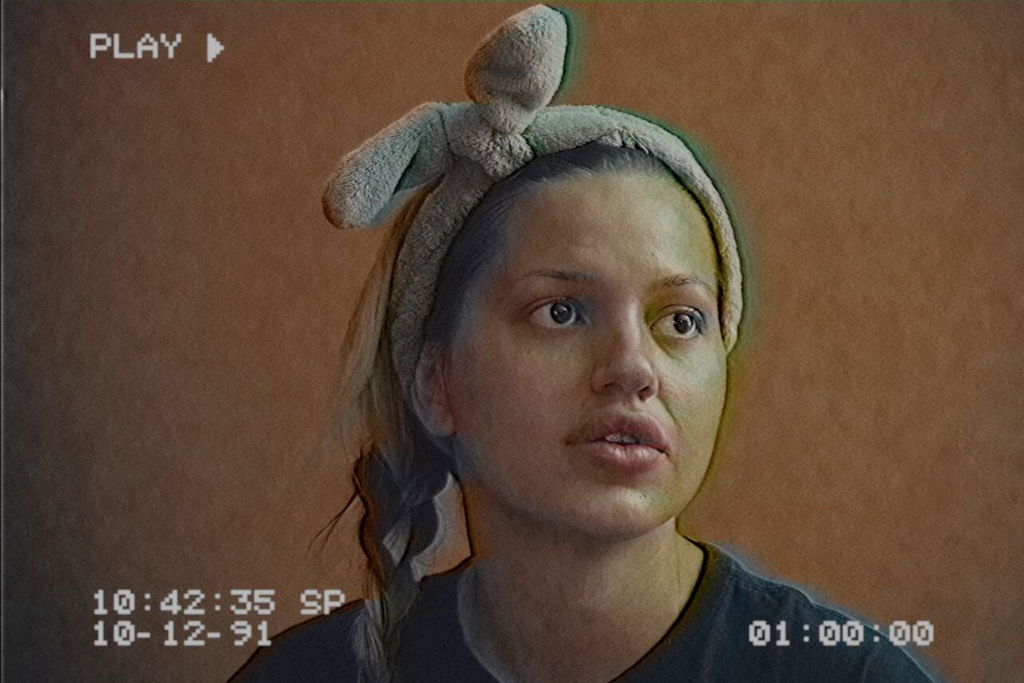
I've been experimenting with retro looks lately and I've really been wanting to capture the VHS looks of the 80's and 90's. There are many ways to do this from scratch in programs like Fusion, but I could never get anything close to the authenticity of this plugin. I was grinning ear to ear messing with it. You can get VHS or CRT looks easily, but if you go into the advanced mode it's crazy how much you can customize the look. I've been integrating it into Fusion comps and it works great. I've already fooled people with 4k footage, thinking it was truly VHS. For me and what I wanted, this was totally worth it. It's so much fun.

I’m not one to typically buy fx like this but it’s perfect for an upcoming project, beats building it from the ground up with native resolve effects. Kaur and Jason are always bringing great tools to colorists, this one isn’t something you’ll use every day but it certainly nails the CRT and VHS thing! Looking forward to having fun with it.
Phosphor is the first retro plugin I've used that behaves like actual hardware instead of a painted-on filter. The full composite-to-tape-to-CRT chain means chroma bleed, scanlines and bloom react to the image rather than sitting on top of it. The fifteen presets are genuinely distinct devices, and advanced mode opens up serious customization when you need a specific era or format. Scene-referred core, so it drops into ACES or RCM without breaking anything, and it holds the same look from 480p to 4K. Runs natively on the Color page, no round-trips. One-time purchase with free updates seals it. Ridiculously fun, and convincing enough to fool people.
Great versatile plugin with tons of control once you switch to advance mode. Will be fun to explore more...
I know it's called phosphor but if it would get an LCD simulation too it would be perfect!
WHY PIXELTOOLS?
OTHER VENDORS
🎨 BUILT BY COLORISTS, FOR COLORISTS


🔒 TRUSTED BY THOUSANDS OF ARTISTS
🧪 RIGOROUSLY DEVELOPED & TESTED
🎛️ MADE FOR COLOR-MANAGED WORKFLOWS (RCM / ACES)
🔑 LIFETIME PERPETUAL LICENSE + UPDATES