



Film/Emulsion™ OFX & DCTL Plug-In – Pro Version
Photochemically-accurate film emulation for DaVinci Resolve
“I ran a series of tests on a feature I had just completed grading, comparing the look I originally crafted using Resolve's Film Look Creator with a new pass built utilizing Film/Emulsion Pro. I found the resulting aesthetic even more compelling than my initial look.”
COMPLETE THE WORKFLOW
Installs through the free PixelTools app. It is the real plug-in, and it renders with a watermark until you buy.
Try the browser previewWatch the film chain respond on sample footage. There is nothing to install.
Film emulation that behaves like film. A node-based system for DaVinci Resolve covering negative, print, halation, and grain — as an OFX plug-in (Pro) or a DCTL set. Built for colorists, DPs, and finishing artists who want a film response that holds together across an entire project, with every stage under your control rather than locked into a fixed look.
 Upgrade to Pro
 Upgrade to Pro
 Product Updates
 Product Updates
Two ways to run the film chain. Pick the format that fits your tree.
OFX Plug-In
Pro onlyOne node holds the full chain (negative, print, halation, grain) with a switch on each stage. Renders on your GPU. 29 Film Look presets to start from, your own setups saved as preset files, and LUT export when a shot has to leave Resolve. Reach for this when you want the look fast and the node tree short. Runs in DaVinci Resolve Studio and the free edition.
DCTL Set
Basic: NEG + PRINT · Pro: all fourEach stage on its own node. Reorder them, mix them, drop a grade between the negative and the print. Reach for this when the shot needs the chain taken apart. Requires DaVinci Resolve Studio.
Note: on Windows, GPU render runs on NVIDIA (CUDA) cards today. AMD (OpenCL) cards fall back to the CPU path while we finish validating them. It renders correctly, just slower. If you're grading on an AMD box under Windows, know that going in.


The full film chain in one node.

Film/Emulsion™
The Full Film Chain, In Either Format
Film/Emulsion™ is a complete film chain for DaVinci Resolve. The Basic tier ships it as a set of DCTLs. The Pro tier adds the OFX plug-in. Negative, print, halation and grain each get a stage with its own enable switch, so you can run the whole chain in one node or split it across several.
The OFX plug-in puts every stage in one inspector. Pick a negative stock and a print stock, set the halation mode, choose grain by gauge and stock, then push or pull the process. The DCTL set gives each stage its own node. That lets you reorder stages or drop a grade between the negative and the print.
Both formats share the same color management. They work in DaVinci Wide Gamut Intermediate and use the same Transfer Function list as every PixelTools plug-in. Use the tabs to switch formats, and pick a node below the DCTL view to see its controls.
Choose your version.
Over 87% of artists choose the Pro version.
What's included
- OFX Plug-In — not included
- 5 Film Stocks — 4 negative, 1 print
- Lifetime License — one-time purchase, no subscriptions
- NEG DCTL — Film negative emulation
- Free Updates — ongoing refinements to existing tools
- PRINT DCTL — Film print emulation
- Film Process PowerGrade — workflow-ready node structure
- Grain/Tool DCTL — not included in Basic
- Balanced LUTs
- Halation/Tool DCTL — not included in Basic
Included Film Stocks
5 stocks — fixed library, no additions
Color Negative — Cinema
- Kodak Vision3 500T 5219
- Kodak Vision3 200T 5213
Color Negative — Motion Picture
- Fuji Eterna 250D 8546
Color Negative — Still
- Fuji Reala 500D 8692
Print Emulation
- Kodak 2383
One-time purchase. No subscriptions.
What's included
- OFX Plug-In — full chain in one node, GPU-rendered
- 20 Film Stocks — more added in updates
- Lifetime License — one-time purchase, no subscriptions
- NEG DCTL — Film negative emulation
- Free Updates — new stocks, tools, and refinements included for life
- PRINT DCTL — Film print emulation
- Film Process PowerGrade — workflow-ready node structure
- Grain/Tool DCTL — Organic grain emulation
- Balanced and Unbalanced Technical LUTs
- Halation/Tool DCTL — Halation emulation
Included Film Stocks
20 stocks now, with more added in updates
Color Negative — Cinema
- Kodak Vision3 500T 5219 Basic
- Kodak Vision3 250D 5207
- Kodak Vision3 200T 5213 Basic
- Kodak Vision3 50D 5203
- Kodak Vision2 250D 5205
- Kodak Vision2 200T 5217
- Kodak Vision 800T 5289
- Kodak Vision 500T 5279
- Kodak Vision 320T 5277
- Kodak Eastman EXR 100T 5248
Color Negative — Motion Picture
- Fuji Eterna 500T 8547
- Fuji Eterna 250D 8546 Basic
Color Negative — Still
- Kodak Aerocolor IV 2460
- Fuji Reala 500D 8692 Basic
- Agfa Vista 200
Print Emulation
- Kodak 2393
- Fuji 3510
- Kodak 2383 Basic
Black & White Negative
- Kodak Double-X 5222
Color Reversal
- Kodak Ektachrome 100D 5294
One-time purchase. Every future release, free.



Straight from the grading suite
based on 25+ reviews

Compatible with
Color Managed Workflows
Film/Emulsion™ works with Resolve Color Management (DaVinci Intermediate), so color stays accurate and consistent across your grade.

Work Faster Using
Blackmagic Control Surfaces
Film/Emulsion™ maps to the Blackmagic Mini and Advanced control surfaces, so you can adjust it by hand with the muscle memory you already have.
Try the Look. In Your Browser.
Real film emulation in your browser. Nothing to install.
Hit Mix to randomize the full chain: negative, print, halation, and grain. Drag the sliders to fine-tune. Compare against the original. This is the same color science that ships in the plugin, running on the actual DCTL math, not a preview shader.
Like what you see? The full plugin gives you the same controls inside DaVinci Resolve, on any timeline, with every stock unlocked.
How the look is built
The Emulsion Stack
-
Source The ungraded log source frame, before any film stage runs.
-
Negative The camera negative. The scene is recorded through a real stock's dye response, with push or pull development and inter-layer coupling built in.
-
Print Printed to stock: printer-light balance, the print curve, and a black floor set by silver density.
-
Halation Bright highlights scatter back through the film base and re-expose the emulsion around them. That's the red-orange bloom real film leaves around highlights, not a uniform glow.
-
Grain Real grain structure, density-aware and per-channel, carrying the resolution loss and scanner character of a film scan.

Ungraded Rec709

Kodak Vision3 500T 5219 Neg + Fuji 3510 Print

Ungraded Rec709

Agfa Vista 200 Neg + 2393 Print

Ungraded Rec709

Kodak Ektachrome 100D 5294 Neg + Kodak 2383 Print (Film)
Buy With Confidence
Professional tools, backed by a fair and transparent guarantee.
Our 7-Day Satisfaction Guarantee
Try PixelTools in your real-world workflow. If it’s not the right fit, we’ll help you get the most out of it. And if it still doesn’t match your needs, you’ll receive store credit to choose another PixelTools tool that better fits your workflow.
Built by Working Colorists
Trusted by 30,000+ Professionals
Fair, Transparent Exchange Policy
Film/Emulsion™: Frequently Asked Questions
What is Film/Emulsion™?
A node-based film emulation system for DaVinci Resolve covering negative, print, halation and grain. Built for colorists, DPs and finishing artists who want a film response that holds together across an entire project, with every stage under your control, not locked into a fixed look.
What film response does it cover?
A full photochemical chain: a film negative (NEG) emulation, a film print (PRINT) emulation with bleach-bypass and shadow controls, halation and grain, all assembled in a workflow-ready Film Process PowerGrade node structure.
What's the difference between Basic and PRO?
Format and stocks. PRO includes the OFX plug-in (the whole chain in one GPU-rendered node) plus all four DCTLs (NEG, PRINT, Halation/Tool™, Grain/Tool™), 20 film stocks and growing, and 12 PowerGrades. Basic is DCTL only: NEG and PRINT, 4 negative and 1 print stock, 4 PowerGrades, no OFX. Already own Basic? Upgrade to PRO using the same email at checkout.
Can I try Film/Emulsion before buying?
Yes, two ways. The interactive browser demo on this page shows the negative → print → halation → grain chain responding in real time, and an OFX demo can be installed through the free PixelTools Installer app (Discover page) to test it inside DaVinci Resolve. Every purchase is also covered by the 7-Day Satisfaction Guarantee.
Do I need DaVinci Resolve Studio?
For the DCTLs, yes: DaVinci Resolve Studio 20 or later (macOS, Windows, Linux). DCTLs don't run in the free edition. The PRO OFX plug-in runs on macOS, Windows and Linux in DaVinci Resolve 20 or later, in both Studio and the free edition, so PRO buyers on free Resolve can still use the full chain. Basic is DCTL only and needs Studio.
Is it a one-time purchase or a subscription?
A lifetime license: one-time purchase, no subscription, with free updates.
How do I install it?
Installation is handled by the free PixelTools installer app: download it, run the installer, and the Film/Emulsion™ DCTLs (and the OFX plug-in on PRO) are placed in the correct Resolve folders automatically. The included PowerGrades import into your Resolve gallery.
I found that my node tree continued to grow and grow and that I began mixing and using too many DCTL's that did not make sense. Pixel Tools continue to enable you to minimize nodes, and especially with film emulsion, it has enabled me to have faster and more consistent results when using Kodak 2382 emulsion flavors. Totally recommend Pixel Tools
I recently ran a series of tests on a feature I had just completed grading, comparing the look I originally crafted using Resolve’s Film Look Creator with a new pass built utilizing Film Emulsion Pro DCTLs. I was genuinely impressed by the results. The toolkit is intuitive, efficient, and remarkably easy to integrate into an established workflow — and in this case, I found the resulting aesthetic even more compelling than my initial look. Film Emulsion Pro will definitely be part of my toolkit on future projects.
Exactly what I was looking for: Simple, sound and flexible.
I use other film emulation tools, but Film Emulsion provides more flexibility in my node tree. Can't wait for more stocks , and the Halation and Grain tools coming up.
Having Nico and Greg work on the project creates so much peace of mind, knowing you have a product of authentic quality.
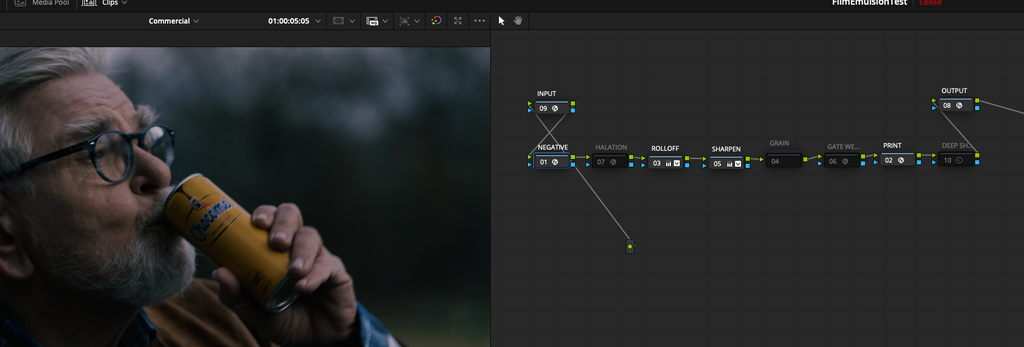
The new Film/Emulsion DCTL is fantastic — beautiful results and responsive support. They quickly fixed a technical issue I had with Resolve 20, and everything runs smoothly now. Highly recommend their tools!
As of early Nov 2025, this tool main feature is PixelTool's Neg and Print LUTs (not bad ones). Colours are nice but black points are very different to the film emulation looks from other reputable DCTLs and OFXs.
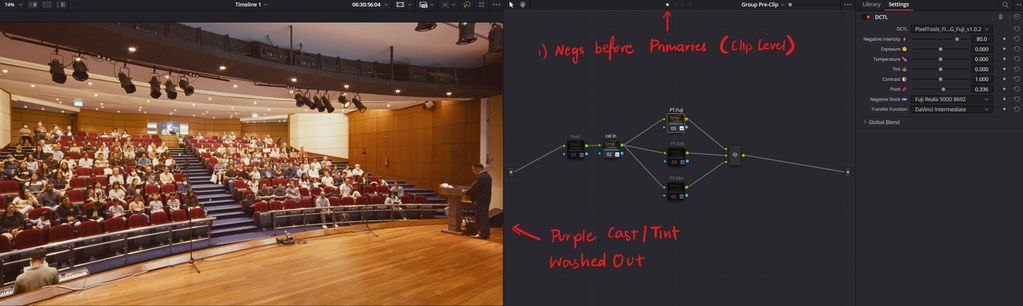
This product is aimed for max customizability in existing workflows, hence the provided Power Grades come across as beginner level. Most experienced Resolve users have their preferred custom node trees, settings and accompanying tools for grading. The given PowerGrade also lacks a primary node before the Negative DCTL node. The order of operations affects the effectiveness of the Neg + Print combo drastically, and it took too many tries before I figured primaries were meant to come before Negs. Hopefully this can be solved with a clear breakdown/how-to pdf.
Until PixelTools add their original take on other Film Emulation characteristics like Grain, Halation, MTF, Dust/Artifacts, Bloom, etc, I think calling this pack Film Emulsion is premature and does not match expectations.
However, the price is hard to beat, and the project is promising since the team plans to add new scans and elements.
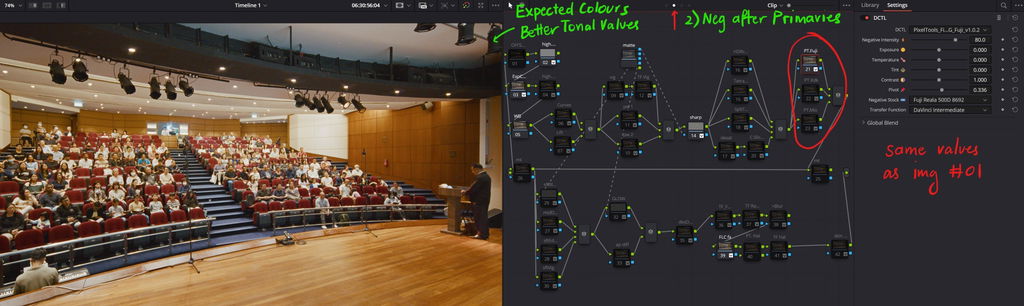
Thank you so much for taking the time to share such thoughtful feedback, we genuinely appreciate it.
You’re absolutely right that some of the film stocks used in our profiling process were expired or older, and the lifted black levels you noticed are a direct result of that. We’ve already released an update that lowers black levels and adds an optional “Deep Shadows” node to the PowerGrade. We will continue refining both the LUTs and PowerGrade as more feedback comes in, so your notes are truly helpful in guiding that process.
Regarding the PowerGrade itself, you’re also correct. It’s intentionally designed as a simple starting point, and not meant to replace a well-established node tree. Based on the examples you shared, you’re exactly the type of user we had in mind when designing Film/Emulsion to be easily integrated into advanced, existing pipelines rather than used “as-is.” The flexibility to place the NEG and PRINT stages wherever they make the most sense in your structure is one of the core strengths of the system, so we’re glad to see you taking advantage of that.
As for features like grain, halation, and other film characteristics, we agree entirely that those are important components of film emulation. They’re currently handled using ResolveFX in v1.0, but our own custom grain and halation tools are already in development and planned as free updates. We follow an MVP-style release model, where we launch the core emulation engine first, collect real-world feedback, and iterate based on how working colorists actually use the tool. Your review directly contributes to that process.
Thanks again for the honest and constructive feedback. We’re excited to continue improving Film/Emulsion and to see how you use it in your work. Happy grading!
I ask for refund after couple day of purchase and didn’t get any answer from you guys
Hi Sawley,
Thanks for taking the time to share this, and I'm sorry for the frustration. I did want to gently clear one thing up, since we care a lot about being responsive. You reached out through our contact form on September 17, and I personally replied within about 30 minutes that same day. My guess is my response slipped into your spam folder, so it's worth a quick peek there.
In that reply, I let you know that we aren't able to offer refunds on digital products (it's noted in our store policy), but I offered an exchange for any other tool or store credit toward something down the road. That offer absolutely still stands, and I'd love the chance to turn this around for you.
Just drop us a line at info@pixeltoolspost.com and we'll get you sorted out. We really do appreciate you giving our tools a try.
On the market for a film emulation DCTL, I tested all the major products and I must say that Film Emulsion does the job perfectly for a very good price as I’m not a pro. Available as an OFX and a suite of DCTLs is a big plus.
Film emulation and its film stocks are excellent and workflow is intuitive. Installation was easy and there's good instructions. I now use them all of my video projects and only time consuming thing is which negative or print one to use. If you want to stand out basic lut looks or want to develop otherwise, this is it.
I own a few of Pixeltools products, but this one is probably the best of them all. Super easy film emulation, just to add that final polish on my client work ro take off the digital edge. I dont need nor like heavy film emulation, but this product is excellent because it add that hint of film magic to my projects, which clients feel, rather than see. I highly recommend this product, if you want super easy emulation integrated into your work.
Film/Emulsion - Film Emulation for DaVinci Resolve
PixelTools Film Emulsion fits beautifully into a Rec.709 workflow. It preserves your base grade while adding a natural, film-like response—especially in highlights and color rendering. The halation and grain feel authentic rather than artificial, and the DCTL-based node workflow gives you precise control without forcing a preset look. Even in Rec.709, it adds depth and softness that removes the digital edge while keeping everything clean and professional. Highly recommended for anyone chasing a true cinematic feel.
Intuitive tool to build great looking final image.
Works as intended with precision and confidence.
Looking forward for more emulations added to the palette
I have been searching for a professional-grade film emulation plugin for some time, and Pixel Tools has proven to be the ideal solution for my needs. It is an exceptionally well-designed tool that allows me to stay true to my established node workflow within the DaVinci Resolve color page, providing maximum control over the end result without any unnecessary guesswork. The plugin consistently delivers beautiful, high-quality results, and I am particularly thrilled about the upcoming additions of halation and grain to further enhance the look. This has quickly become an essential component of my color grading arsenal, and I couldn’t be happier with the integration.
Film/Emulsion - Film Emulation for DaVinci Resolve
I’m more than happy to get an amazing film emulation at this price point. I’ve been using a film emulation that costs a perpetual $999, and in some ways I feel I like Pixel Tools more. For example, I really like how I can adjust the percentage of the look based on my preference. I often don’t want to go for the full film look, so I have more room for my own creative color tweaks.
I also like the flexibility of being able to mix and match different negs with different print stocks, and the fact that I can use it with any of my favorite ODTs.
Still curiously waiting for Pixel Tools’ upcoming custom grain and halation in the next update. If their grain and halation can compete with other film emulations, then I personally don't see a reason to look for any other film emulations.
The Pro version really gives me the best starting point for my log footage. Everything is drag-and-drop, and the variety of looks provides a lot of great starting options. I originally purchased the Basic version, which was okay but very limiting in terms of looks. Once I upgraded to the Pro, I finally felt I was getting real usability out of my original investment. If I had to choose between the two, the Pro is a much more complete product in terms of usable content.
In a sea of film emulation products, I've been loving what Jason & the team have cooked up here. Can't wait to see what's added and how the product evolves in the future!
I think the default settings for Film Emulation are great,
but the great thing about it is that there's room for adjustment and customization depending on the material.
I also like how I can quickly consider, even roughly, the direction of the finished product.
After watching the YouTube presentation by Jason and a couple of reviews by some colorists that had the opportunity to test the new plugin by PixelTools, I decided to purchase the Film Emultion/Film Emulation Tool by PixelTools. My decision was also based on the fact that PixelTools' product is significantly cheaper than other highly regarded plugins. I don't know other Film Emulation plugins directly and have only seen reviews and demonstrations on YouTube, but I had the clear feeling that for the work I do primarily with my clients, PixelTools' plugin could fully meet my needs at a more affordable price. One of the things that immediately struck me was how easy it is to use, how "breakdown" it is into different nodes, ready to go if you use the PowerGrades that come with the various DCTLs, LUTs, etc. This is by no means to say that the process of emulating "old" film is simple: it is always necessary to fully understand what you are doing, what needs to be done, and how to do it if you want to achieve truly professional results. But the tool provided by PixelTools gives us the opportunity to experiment in a "guided" way, and helps us in the process of understanding. Personally, I can only once again appreciate the work of Jason and his collaborators: they always prove to be honest professionals and sincerely passionate about the potentially "infinite" subject of color grading. Thank you!
Title says it all. Intuitive and robust controls give you the power to apply film looks as you see fit!
PixelTools Film Emulation has been such a refreshing solution in today's sea of options. Not only is it affordable, but a great team of people have developed something magical here. The results have made film emulation a joy, with beautiful results that don't feel like you've slapped a LUT on your footage. You have ultimate control with it's powergrade node structure, but it never feels overwhelming or too pushed. The results feel organic and natural, and I love having the ability to mix and match different negatives and prints. The tools are fast, easy to navigate and do not stress the system like some others can. What has impressed me the most is what's yet to come, knowing this tool will expand and give us all even more ways to make our footage shine. I'm so excited for their grain and halation coming at some point! Not only has this been a great tool, but Jason and the team are just wonderful people who strive on helping you when you need it. I highly recommend Film Emulation!
It fits perfectly in my workflow, and the results are even better than other plugins out there for a fraction of the price.
I’m very new to color grading. I have spent countless hours learning the how and the why of color grading and I have yet to feel confident in color grading.
I decided to try Pixel Tools and so far I feel like I am on my way to better color grading.
I am spending much less time on the guesswork and productivity is ramping up.
I’ve used other film emulations, but this plugin stands out because it allows for node-based adjustments, which is something I really appreciate.
This is a bunch of very useful tools for the colorists and filmmakers. Jason and his team have made an excellent set of tools. Easy to use, result-oriented and satisfying in wide aspects.
These film emulations really made a difference and were the missing piece to my look dev puzzle.
WHY FILM/EMULSION?
OTHER VENDORS
🎨 BUILT BY COLORISTS, FOR COLORISTS


🔒 TRUSTED BY THOUSANDS OF ARTISTS
🧪 RIGOROUSLY DEVELOPED & TESTED
🎛️ MADE FOR COLOR-MANAGED WORKFLOWS (RCM / ACES)
🔑 LIFETIME PERPETUAL LICENSE + UPDATES
These presets are original interpretations and are not affiliated with, endorsed by, or derived from any film, series, rights holder, or individual.