



Prime/Grade™ OFX & DCTL Plug-In
“This tool literally combines 3 nodes in my workflow and makes it incredibly easy to work fast without worrying about what is happening under the hood. This is a must have tool!”
Individual license, for productions with budgets up to $5 million USD. Studios and larger productions: see Studio licensing.
COMPLETE THE WORKFLOW
Test it in your own project before you buy.
Build a clean, balanced image in one step, not a node stack. Prime/Grade™ is an all-in-one primaries tool for DaVinci Resolve, bringing exposure, contrast, and color controls together. It ships in two formats under one license: an OFX plug-in (beta) that runs in Resolve Studio and the free edition, and a DCTL for Studio.
Best suited for colorists, DPs, and editors who want to move faster through primaries while keeping results consistent.
New to DCTLs? See our complete guide to DCTLs in DaVinci Resolve.
 Demo Version
 Demo Version
 Product Updates
 Product Updates
Flat to finished, in one node

Ungraded

Prime/Grade™
Both formats included. Pick per shot, not per project.
OFX Plug-In (beta)
Included with every purchaseThe same primaries in one node, rendered on your GPU. Reach for this when you want faster playback, or when the project lives in the free edition of Resolve. Runs in DaVinci Resolve Studio and the free edition. macOS, Windows, Linux. Still in beta: new features are landing over time.
DCTL
Included with every purchaseThe Prime/Grade™ DCTL plus its PowerGrade, with the five built-in checkers on its own node. Reach for this when the shot's already deep in a DCTL-based tree and you want the process to match it. Requires DaVinci Resolve Studio.
Note: on Windows, GPU render runs on NVIDIA (CUDA) cards today. AMD (OpenCL) cards fall back to the CPU path while we finish validating them. It renders correctly, just slower. If you're grading on an AMD box under Windows, know that going in.

Eliminate the need to jump between tools and nodes
Primary Controls Built for Color-Managed Pipelines
Prime/Grade is an all-in-one primaries tool designed for accurate and efficient color correction, with advanced options for customizing its core processing.


Prime/Grade™
The One-Node Primary Tool
Prime/Grade™ is an all-in-one primaries tool for DaVinci Resolve, available as an OFX plug-in or a DCTL. Exposure, contrast, balance and saturation live in one step, so you can build a clean, balanced image without stacking nodes.
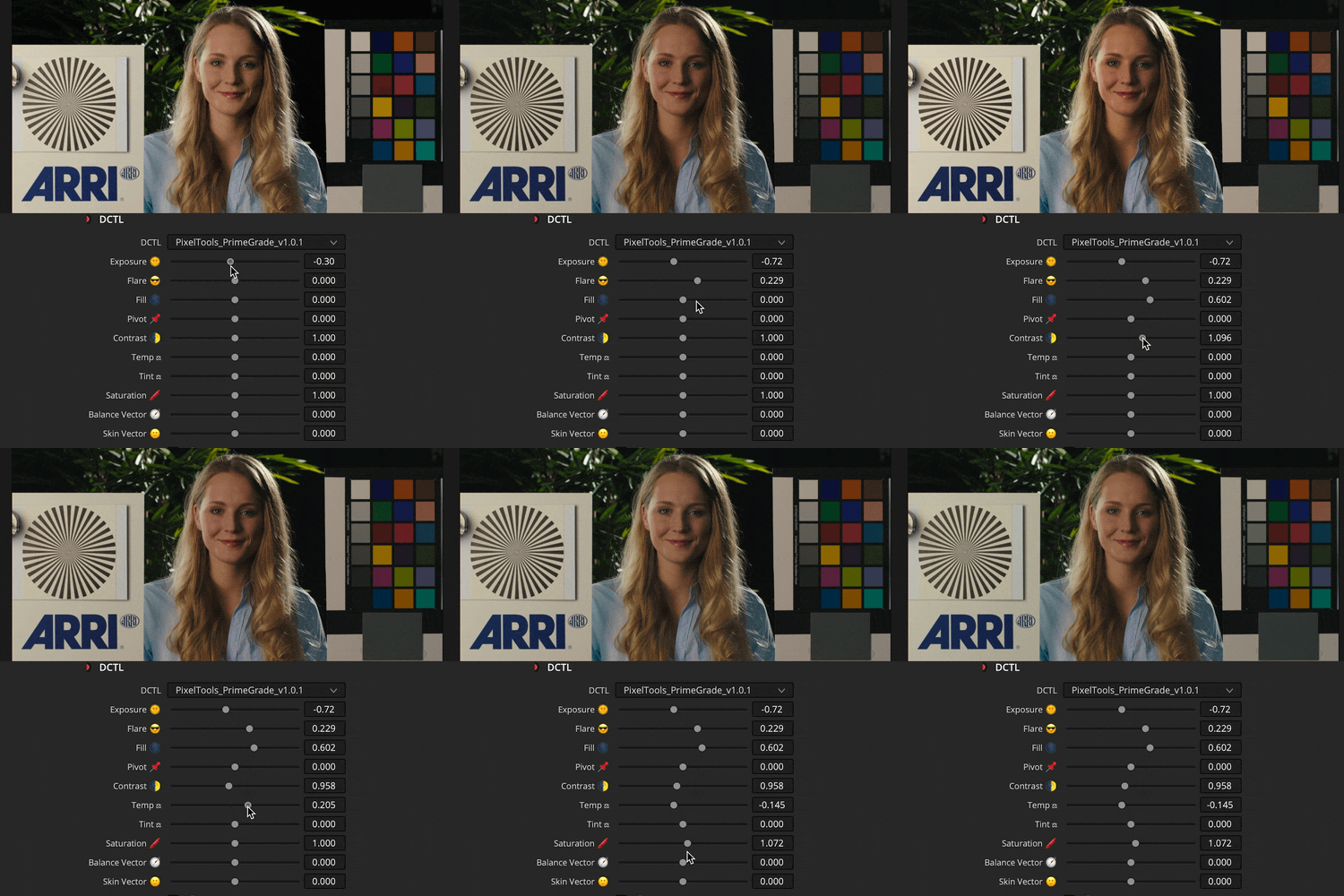
Set exposure with Linear Gain, Gain or Offset. Flare and Fill shape the toe, and Fill lifts shadows without flattening the rest of the image. Contrast runs as an S-Curve or a straight Linear curve. Temp and Tint balance across the same three exposure modes. Saturation is tuned to hold up under heavy grading the way film does.
Five built-in checkers help you read the image as you grade: a ±5 stop False Color, Skin Tone, White Balance, Middle Gray and Negative. Prime/Grade™ works in DaVinci Wide Gamut Intermediate and supports the same 23 Transfer Functions as the rest of the PixelTools line, so it drops into ACES, RCM and manual CST workflows.



Straight from the grading suite
based on 57 reviews

Compatible with
Color Managed Workflows
Prime/Grade™ seamlessly integrate with Resolve Color Management (DaVinci Intermediate) and ACES workflows, ensuring accurate and consistent color management throughout your entire post-production pipeline.

Work Faster Using
Blackmagic Control Surfaces
Prime/Grade™ integrates seamlessly with Blackmagic Mini and Advanced Control Surfaces, enabling quick adjustments without disrupting your current grading workflow or established muscle memory.
Prime/Grade In Action
Used daily by professional colorists: learn more inside.
Prime/Grade™: Frequently Asked Questions
Does one purchase include both the OFX plug-in and the DCTL?
Yes. Every Prime/Grade™ purchase includes the OFX plug-in (beta) and the DCTL, plus the PowerGrade and the five built-in checkers. There is no separate tier and nothing extra to buy.
What is Prime/Grade™?
Prime/Grade™ is an all-in-one primaries tool for DaVinci Resolve, shipped as both an OFX plug-in (beta) and a DCTL. It consolidates exposure, contrast, balance and saturation into a single step, so you build a clean, balanced image without stacking nodes. Exposure works through Linear Gain, Gain or Offset; Flare and Fill shape the toe; Contrast offers both S-Curve and Linear behavior; and saturation uses a subtractive model for a more film-like response under heavy grading. Built for colorists, DPs and editors who want to move faster through primaries.
What's included?
Both formats (the Prime/Grade™ OFX plug-in (beta) and the DCTL) plus five built-in checkers for reading your image as you grade: a ±5 stop False Color, Skin Tone, White Balance, Middle Gray and Negative. It works internally in DaVinci Wide Gamut Intermediate and supports 23 transfer functions, dropping cleanly into ACES, RCM and manual CST workflows.
Can I try Prime/Grade™ before buying?
Yes. A free Prime/Grade™ demo is available, so you can load it into your own footage and see how it behaves in your pipeline first.
Do I need DaVinci Resolve Studio?
For the DCTL, yes: DaVinci Resolve Studio 20+ is required, since DCTLs don't run in the free edition. The OFX plug-in (beta) runs in both Studio and the free edition. Both formats come with every Prime/Grade™ purchase, no separate tier.
Is the OFX version finished?
Not yet. The OFX version is in beta and included with your purchase. The DCTL version is included too. Updates are free for the version you own. Major versions are discounted paid upgrades for owners.
Is the OFX plug-in fast enough to grade in real time?
Yes, on an M1 MacBook Pro the OFX plug-in holds real-time playback at UHD, so you're grading at cinema frame rate rather than scrubbing a preview.
Is it a one-time purchase or a subscription?
One-time payment, no subscription. Updates are free for the version you own. Major versions are discounted paid upgrades for owners.
How do I install it?
Installation is handled by the free PixelTools installer app: download it, run the installer, and both the Prime/Grade™ DCTL and the OFX plug-in are placed in the correct Resolve folders automatically, no manual file-copying.
I am buying for a facility or a production over $5 million. Is this the right license?
The price on this page is the Individual license: one colorist, your own machines, productions with budgets up to $5 million USD. Facilities, teams, and bigger productions need Studio seats: the same grading features, with PO invoicing, priority support, and offline activation today, plus floating seat management delivered within 12 months of purchase. See Studio licensing.
An excellent tool that significantly speeds up my workflow! I only need a single node to handle most adjustments (exposure, white balance)—the entire primary color correction in one node. And, above all, the quality of the results is truly impressive!

This is a must-have tool from Pixel Tools. It's an all-in-one beginning node that gives you fast and consistent balance across projects. Using hue shift, split tone, and Pixel Tools Film Emulsions afterwards gives amazing results. I am finding it much better to stay with a 'system' and a set node tree and use products that are designed to work in concert with each other.

The module is very useful. It simplifies exactly the solutions I need. It is quick and easy to use.

Making mainly family and holiday films colouring was time consuming. Results: films piling up. Watching some video’s on YT I came across this dctl. Arfter downloading the demo and testing the dctl I was gobsmacked. Wow my video’s look So much better in a fraction of the time. Last week i bought the full version ( half a week before the sale 🫤). Now in three days I recoloured my last video, which was too dark. The original time spent colouring was > 1 month. Love the dctl !

Es perfecto este dctl, todas las correcciones primarias en un solo nodo con solo unos clicks puedo corregir la base de cada clip muy rápidamente, es mi favorito por lejos!.

Hi y’all! This tool is very smooth, I feel I’ll be going steady 😏

PixelTools and Kaur H. again know how to deliver quality. You dont know what is missing in native Resolve untill you've tried and used PixelTools Or Kaur's DCTLs. Im happy to say these tools have a place in my node tree forever.

From basic corrections, to balancing and shot matching, everything has been much quicker with the help of this single tool.
Great DCTL to shape the image fast and reliable.
Great DCTL, brings all the great stuff in one place.. it changed my workflow and I don’t want to miss it…
Amazing tool concentrates all that is needed for setting primaries in one node
IntegratedCheckers and charts is a must
Available as dctl and ofx plugin
This tool effectively consolidates three nodes in my workflow into one, significantly streamlining the process and making it much easier to work efficiently without needing to manage the underlying complexity. A highly valuable addition to any workflow and definitely a tool I would recommend.
I’m really liking the fact that everything is in one place. Being able to check skin, white balance and false colour so quickly is really smart. The one thing I would suggest is potentially consider renaming the “flare” and “fill” sliders. When turning on the curve display it obviously makes sense but when working with other contrast-shaping tools, it’s nice to have similar terminology for the same thing. That’s just me though. It’s by no means a problem at all. Can’t wait to use this on my next project! Thank you.
Absolutely great DCTL. Prime/Grade is clean, intuitive, and very useful for building a solid primary correction quickly. The exposure, white balance, skin checker, and false color tools make the grading process much faster and more consistent. It fits perfectly into a professional DaVinci Resolve workflow and helps keep everything organized in one node. Highly recommended.
Prime/Grade™ has become a useful part of my grading workflow. It provides a clean and efficient approach to primary corrections, helping establish a solid foundation quickly while maintaining a natural and professional image.
Prime/Grade™ has become one of the most useful DCTLs in my grading workflow. It helps me separate tones and shape color contrast in a much more natural and controlled way compared to using standard Resolve tools alone. The interface is clean, fast, and easy to experiment with creatively.
What I like most is how quickly I can build a cinematic look without fighting the image. It speeds up my workflow a lot, especially during look development and balancing skin tones against the environment. The results feel organic and filmic rather than overly processed.
I also appreciate how smoothly it integrates into a professional node tree. It’s one of those tools that quietly becomes essential once you start using it regularly.
Film Emulation for DaVinci Resolve offers beautiful, cinematic looks that significantly speed up my grading workflow and help me achieve a professional result in fewer steps. The emulations feel natural and musical, making it easy to enhance the mood and style of my shots without overly complex adjustments.
Prime/Grade™ DCTL Plug-In
I definitely would recommend this plugin because I’ve tried it on my projects and does definitely what it says.right it’s my primary go to plugin.
As a filmmaking all-rounder, I need to move fast. I’m tired of getting lost in Resolve’s endless menus, HDR wheels, and complex node trees. I don’t want to stop and think about whether a node is set to linear or an S-curve, I just want to grade. Prime Grade handles all that heavy lifting for me. It’s color-space aware and optimized right out of the box, so I can stay in the creative flow instead of worrying about the math. My entire node tree is built around it now; it simplified my process and the results are professional. If you want a workflow that actually stays out of your way, this is it.
I really enjoy using their products. They make my color grading workflow in DaVinci Resolve highly intuitive and efficient, while consistently delivering excellent results.
I can confidently recommend both the products and the team behind them.
Recently I started using the Prime/Grade DCTL plugin for DaVinci Resolve, and it has significantly sped up my workflow. I’m able to achieve better results with fewer nodes, saving a lot of valuable time. Truly a powerful and well-designed plugin. Thank you for creating it.
This is one of the simplest grading tools I have used. As with everything from pixel tools the ease of install and use makes this a dream to use. I love the fact that it is impossible to break your image using this grading tool. I use this on every grade.
I use it as my first node to set exposure (in stops), tweak my shadows and adjust temp/tint and saturation all in one node. Temp, tint and saturation are way better than their counterparts in Davinci Resolve. prime / grade allows me to work faster and with less nodes at a very reasonable price.
I would recommend this highly If you want to keep your node tree minimal, as this allows you make all your prime grades in one node. Leaves you more room to get creative with all our secret spice nodes :D
I used this last time doing a quick grade remotely with a small ui screen, was super handy for that setup. I can imagine this would be also very helpful also for someone who is just starting to learn color grading.
I'm new to the color grading world using Resolve in conjunction with PixelTools. I purchase the Prime/Grade DCTL and very much like the results so far. Easy adjustments in one dctl helps my workflow so much. Great job guys!!!
This is a great tool to get your base grade started in a fast way. Normally, I use a powergrade with the first few primaries nodes set up in linear space and HSV to get better results. This DCTL helps me adjust these parameters in the same way with only one node without the need to jump between nodes to refine the settings. The monitoring tools are also terrific, aiding in the process of setting exposure and balance.
The DCTL is awesome. I’ve watched countless YouTube tutorials and got very little out of them. Once I bought this DCTL my color grading looked so much better. I especially love all of the checkers.